Leer artículo en español
Ver artigo em português
The Forum is a space intended for the exchange of messages among class members.
- It facilitates direct communication and the resolution of questions.
- It allows the sharing of announcements of interest and helps maintain interaction between students and teachers.
- All published messages are visible to students, who can respond through comments.

How to create a new topic?
To start a conversation or post an announcement:
- Click on <New topic>.
- Assign a title to the topic.
- Write your message in the text editor.
- Select a tag to classify the topic.
- Click on <Create> to publish it.

How to interact with messages?
- Messages created will be visible to all students.

- To reply, click on <+ Add comment>.

- Comments will be displayed below the original message, creating a conversation thread.

The teacher has the ability to remove comments that are not relevant to the topic or that are aggressive or inappropriate, ensuring a respectful and collaborative environment.

Search filters
To find messages more efficiently:
- Use tag filters.
- This allows you to view only topics related to a specific category.
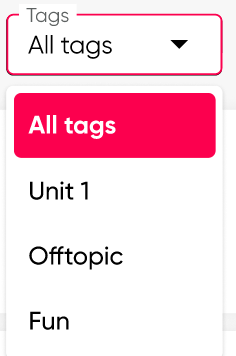 Filtros de etiquetas
Interaction recommendations
- Use clear and consistent tags to keep the forum organized.
- Post important announcements in a separate topic so they are easy to identify.
- Regularly review comments to maintain active communication.
- Keep a respectful tone in your messages; remember that the teacher can moderate and remove inappropriate comments.